ADVERTISEMENT
Electronics & Tech News
Why Upgrade to SSD? - Advantages for Faster Computing
When it comes to computing, speed and efficiency are often critical. One of the most significant advances in achieving these goals is the introduction of solid-state drives (SSDs). As traditional hard drives (HDDs) become increasingly obsolete, people turn to SSDs to improve their computing experience. In this comprehensive guide, we explore the many benefits of SSDs, discuss how they can improve performance, and explain why upgrading to an SSD may be the best decision for your computer.
Advantages of SSD: High-speed revolution
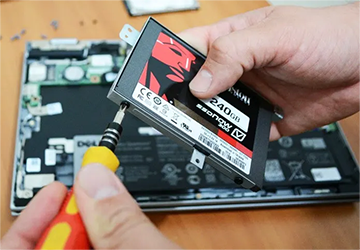
When it comes to the advantages of SSDs, speed is the most obvious one. While traditional hard drives use rotating mechanical parts to read and write data, SSDs use flash memory to speed up data access and storage significantly. When using an SSD, boot times can be up to twice as fast, and file transfers can be performed at speeds unimaginable with a hard drive. This faster performance not only saves you time; It improves the overall efficiency of your work, making it one of the most impactful upgrades you can make to your computer setup.
Durability and Reliability: The Unsung SSD Advantage
In addition to faster performance, another key advantage of SSDs is durability. Since SSDs have no moving parts, they are less susceptible to damage from drops or impacts. This makes them especially useful for laptops, which typically take more rough handling than desktops. Additionally, SSDs are less likely to fail due to mechanical issues, making them a more reliable long-term storage solution.
Energy Efficiency: The Green Advantage
One of the lesser-known advantages of SSDs is their energy efficiency. SSDs consume less power than traditional hard drives because they don't need to power any mechanical parts. Reducing energy consumption saves electricity costs and helps extend your laptop's battery life by eliminating the need to plug it in as frequently, thus improving your laptop's performance.
Storage Capacity and Cost: The Changing Landscape
Initially, one of the disadvantages of SSDs was limited storage capacity and higher cost per gigabyte. However, as technology advances, SSDs are becoming increasingly cheaper. While they generally cost more than hard drives, the gap is closing, and SSDs' faster performance and other advantages often justify the higher price. Additionally, SSDs now offer capacities comparable to HDDs, making them ideal for users who need a lot of storage space.
Compatibility: Varies
Upgrading to an SSD is complicated, but it's getting easier. Most modern operating systems are optimized for SSD use, and cloning software can quickly transfer data from the hard drive to a new SSD. However, check your computer's specs to ensure it can take full advantage of the SSD's faster performance.
Versatility: The underrated aspect of SSDs
Another less-discussed feature of SSDs is the versatility of these storage devices. Solid-state drives are highly flexible and can be used in various computing environments, from high-end gaming setups to embedded systems in server farms and industrial machines. They generate less heat than hard drives, making them ideal for confined spaces and systems where thermal performance is critical, enhancing their faster performance characteristics in professional applications.
Security features: protect your data
In today's digital age, data security is more important than ever, and SSDs offer a range of features to protect your information. Many modern SSDs have built-in encryption, making it difficult for unauthorized users to access your stored data. Some even include specialized software that allows you to effectively manage these security features, adding another layer of security. These security features are often overlooked, but they are an essential advantage of SSDs, resulting in faster performance and reliability.
Noise reduction and heat dissipation: silent advantage
SSDs operate much quieter than their HDD counterparts. Hard drives make noise due to the movement of their spinning disks, and reading/writing heads often make noticeable noise, which can be annoying in a quiet environment. Since SSDs have no moving parts, they are virtually silent. They are soft and generate less heat, reducing stress on your system's cooling mechanisms and helping to provide a quieter, more enjoyable computing experience.
Maintenance: a worry-free experience
SSDs also have advantages over hard drives in terms of ease of maintenance. The lack of mechanical parts means fewer errors occur from a hardware perspective, reducing the need for frequent maintenance or replacement. Most SSDs have software that provides a user-friendly interface to monitor the drive's health. This also makes it easier for less tech-savvy people to monitor their devices' status. This ease of maintenance is a long-term advantage of SSDs, saving time and money.
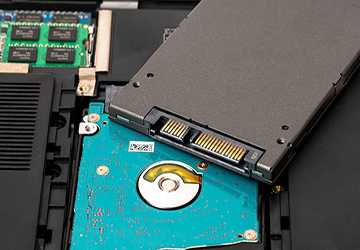
Upgrade Scalability: Future-proof your system.
As technology continues to advance, adaptable systems are critical. One advantage of SSDs is that storage can be easily expanded, which makes this much more accessible. Thanks to broad compatibility and easy-to-use cloning tools, you can easily add solid-state drives to your system or replace them with higher-capacity drives. This makes SSDs an excellent choice for those who want to future-proof their systems, ensuring they can quickly adapt as technology advances and benefit from faster performance.
Portability: The Hidden Advantage of SSD
Another aspect to consider when discussing the advantages of SSDs is portability. Because SSDs are compact and have no sensitive moving parts, they are highly portable, making them ideal for external storage solutions. Whether you're a professional who needs to transfer large amounts of data or a regular user who wants to transfer files securely and conveniently, SSDs can provide practical solutions. Its sturdy construction makes it less susceptible to daily wear and tear, enhancing its usefulness as a portable storage option. With faster performance, SSDs provide powerful and mobile storage solutions that meet the demands of today's on-the-go lifestyle.
Conclusion: The fast future of storage
All in all, upgrading to an SSD offers many powerful benefits. The benefits of SSDs are hard to ignore, from significantly faster performance to improved durability and energy efficiency. As technology advances, SSDs become more affordable and easier to use, cementing their place as the future of computer storage solutions. Investing in an SSD is more than an upgrade; This is a step toward a more efficient, reliable, and faster computing experience.
Related Articles
Electronics & Tech News
September 25, 2026
Top 8 Best Practices in IT Service Management

Electronics & Tech News
September 21, 2026
How to Align Your IT Strategy with Business Goals

Electronics & Tech News
September 12, 2026
Top 10 Must-Have Tech Gadgets for the Modern Digital Nomad

Electronics & Tech News
September 8, 2026
How to Develop a Mobile App A Step-by-Step Guide for Beginners

Most viewed
Best Settings For Apex Legends
October 10, 2026

Electronics & Tech News
7 wonders possible with CRISPR Cas technology
September 25, 2026
Electronics & Tech News
6 Techniques to Improve Your Computer’s Performance
September 19, 2026
Electronics & Tech News
4 Ways Smart Home Devices Can Simplify Your Daily Routine
September 13, 2026

Electronics & Tech News